Bee
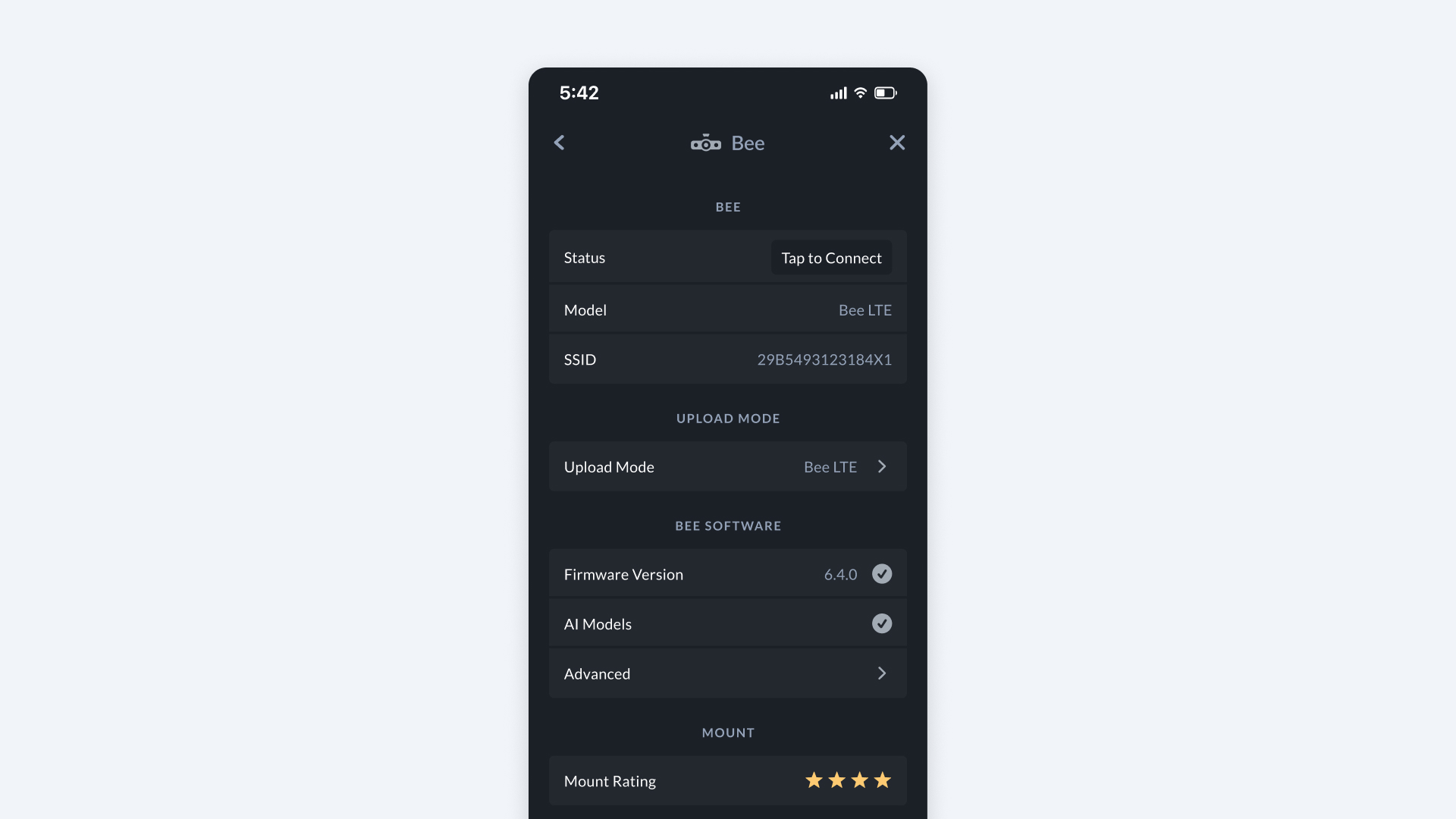
The Bee section lets you view and manage your Bee device connection, upload settings, and software.
How to Find it
- Open Bee Maps App.
- Go to Settings.
- Go to Bee.
Device Information
- Status -- Shows whether the App is connected to your Bee. Tap to connect if not already linked.
- Model -- Displays your Bee model - Bee LTE or Bee WiFi.
- SSID -- Shows the Wi-Fi network name of your Bee device.
Upload Mode
- Upload Mode -- How your Bee sends captured data to the network.
- LTE (only available with Bee LTE model)
- Bee Maps App
- WiFi Connect
Bee Software
- Firmware Version -- Displays your current firmware version.
- A check mark means Bee is on the latest firmware.
- AI Models -- Indicates if you have AI models active on your device.
- Advanced -- Additional settings for power users (firmware options, fleet linking, etc.).
- Must be connected to Bee to access.
Mount
- Mount Rating -- Your current mount rating (1--4 stars).