
Data Protection & Privacy
You can find more information on the privacy center, a comprehensive portal that includes all the relevant information about privacy with the Bee camera, including:
- Key aspects of data collection and data products generated from map imagery
- A list of cities and countries where mapping collection is occurring each quarter
- The current Privacy Policy
Here are some of the ways that we implement "privacy by design."
1. Anonymous Usernames
Bee Maps will never ask contributors to share personal information such as phone numbers, credit card numbers, or home addresses, except when absolutely necessary to fulfill a shipment. We generate random three-word usernames to protect the identity of its contributors, and asks contributors not to share their usernames anywhere to shield their identities.
2. Anonymized Location Data
The location data is not associated with a username. We do not share usernames or places that have been mapped, so no one will know those locations unless provided.
3. Trip Trimming
The first 500 meters and the last 500 meters of a given trip are automatically discarded. A contributor can adjust this up to 1,000 meters. This feature cannot be disabled. See privacy settings in the Bee Maps App for how to configure this on your device.
4. Personal Privacy Zones
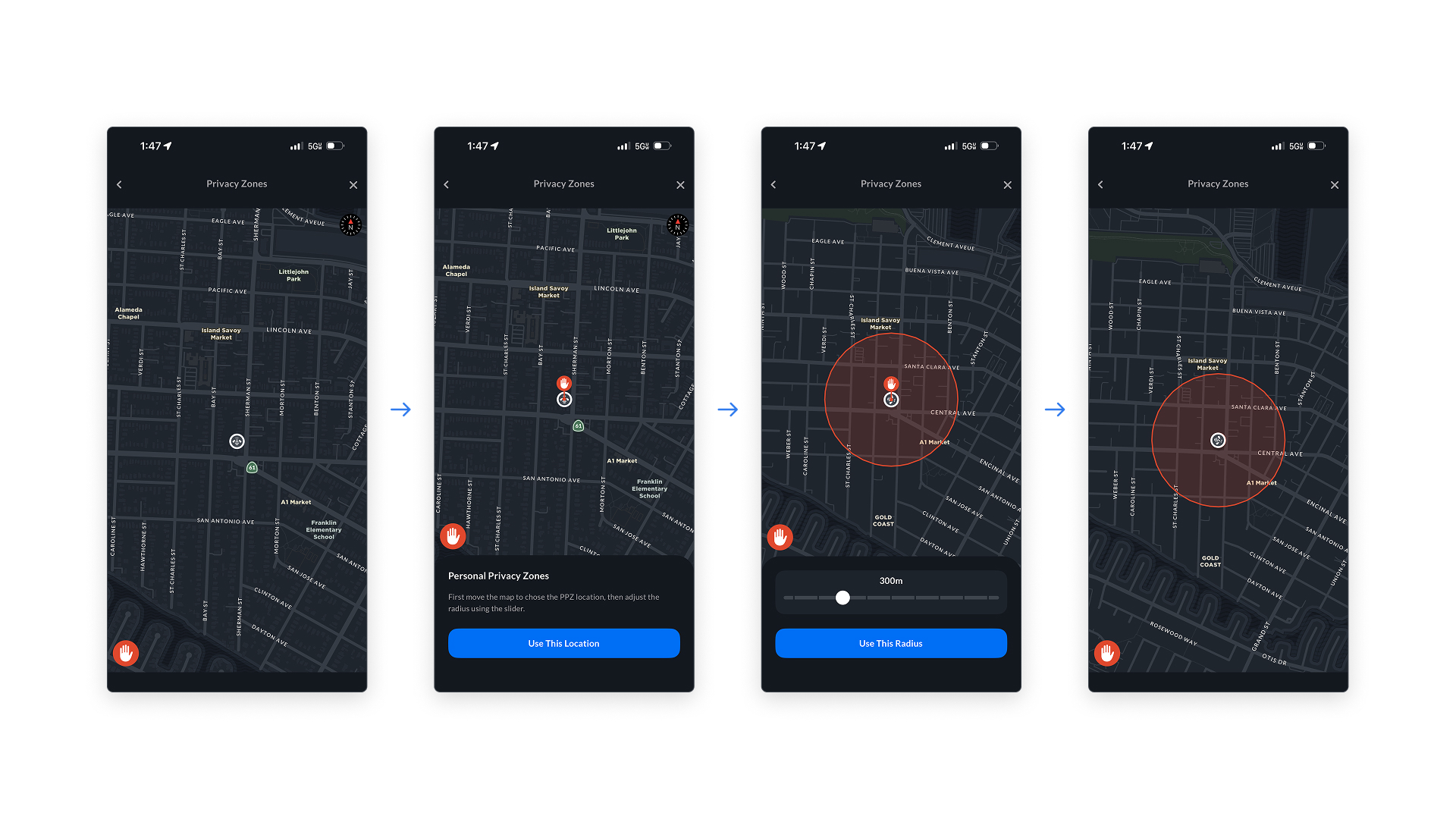
This feature enables a contributor to define specific geographic areas — be it around their home, workplace, or any other location — as zones where their device will stop recording. Whenever the contributor's device enters a personal privacy zones, it automatically pauses data collection. This eliminates a contributor's need to manually stop or disable the device as they navigate spaces that they don't want to map.
Personal Privacy Zones are never shared with servers, and remain confidential on your Bee device. See privacy settings in the Bee Maps App for how to configure your Personal Privacy Zones.
5. Network Privacy Zones
Network Privacy Zones extends privacy to sensitive areas where everyone's data collection will be paused. If a location such as a military base, nuclear power plant, or private industrial facility is designated as a Network Privacy Zone, the Hivemapper Network automatically blocks collection within that area.
6. Contributors Know When They Are Mapping
All devices make it clearly visible to the contributor when they are actively mapping via LED lights and via the companion app.
7. Blurred Faces, Bodies, Vehicles, and License Plates
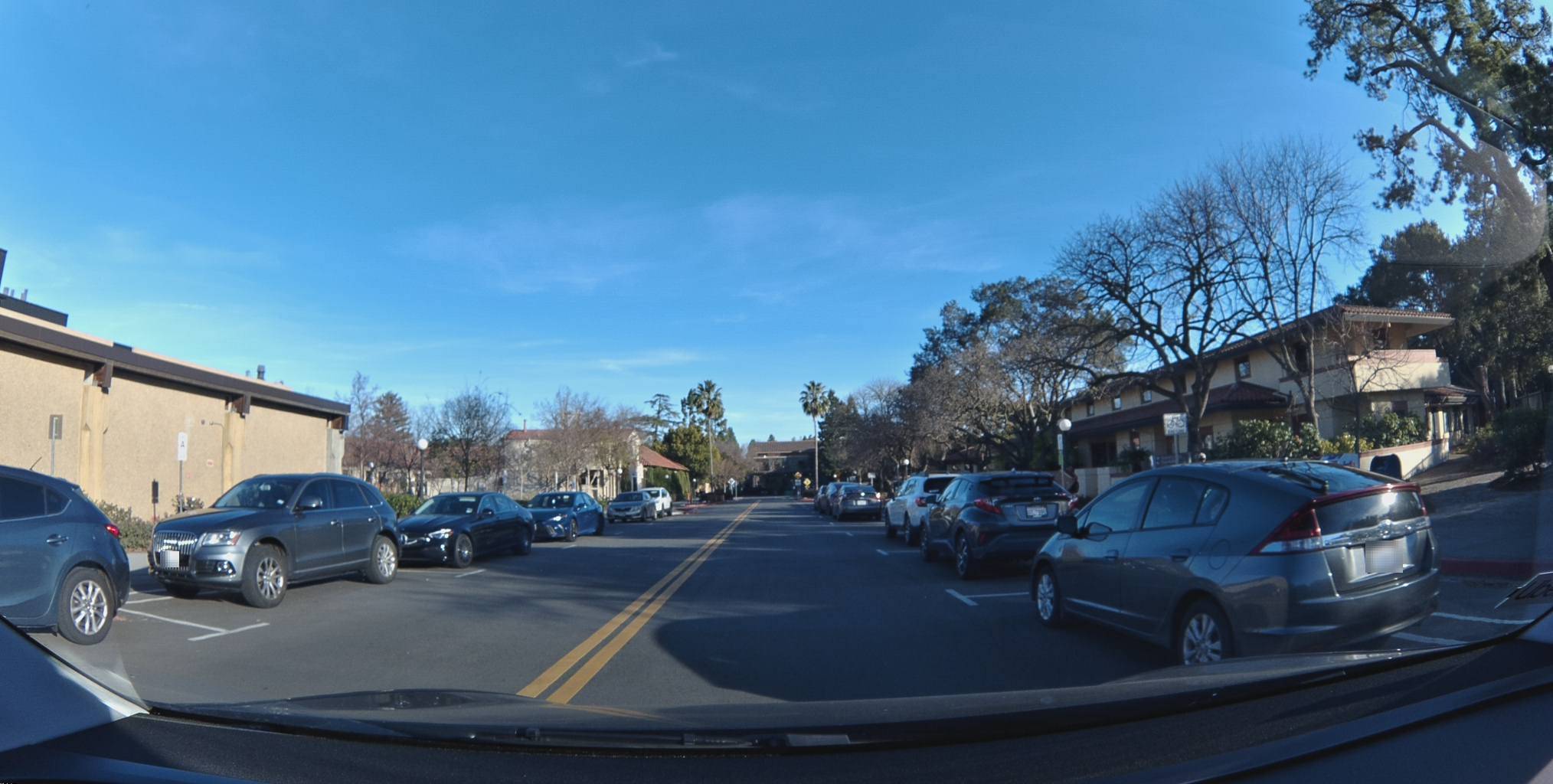
As the Bee maps, it collects both imagery and video. To protect the privacy of anyone who happens to be captured, the Bee uses computer-vision algorithms to blur out faces, bodies, vehicles, and license plates. For example, the image below shows a submission from a Bee device that went through privacy blurring. Blurring occurs automatically on the edge on all device models.
8. Submitting a Removal Request
Bee Maps can assist with blurring or deletion of personal information that is inadvertently collected by a Bee. If you have a request, please fill out the Removal Request form in our privacy center or contact us at [email protected].
To help us identify the relevant materials, please include the following pieces of information in your message:
- The three-word username of the contributor and the time window when the collection occurred.
- The street address where the collection occurred and a description of the precise area, including landmarks such as position relative to adjacent streets.
- The type of private information that was collected.
9. Placards for Mappers
In certain countries, we work to ensure that bystanders are aware that a device is collecting for a map. Device contributors mount a placard provided by Bee Maps.
| Language | Download |
|---|---|
| English | Bee Placard - English.pdf |
| French | Bee Placard - French.pdf |
| German | Bee Placard - German.pdf |
| Korean | Bee Placard - Korean.pdf |
| Portuguese | Bee Placard - Portuguese.pdf |
| Simplified Chinese | Bee Placard - Simplified Chinese.pdf |
| Spanish | Bee Placard - Spanish.pdf |
| Traditional Chinese | Bee Placard - Traditional Chinese.pdf |
10. Government Privacy Regulators
We proactively work with government regulators to ensure that our privacy standards meet local regulations and are the best in the industry.