
Bee Edge AI
Bee Edge AI
Program the Bee camera to collect data from the physical world you want
Build and deploy custom AI workloads on the Bee's edge computing platform. Write Python modules, push them OTA to Bee devices worldwide or your own devices, and stream results to your cloud.
Key Differentiation
- Edge compute, not cloud latency -- Run object detection and ML inference directly on the 5.1 TOPS NPU. Results in milliseconds, not round-trips.
- Zero hardware and telecom ops -- Deploy to a global fleet instantly. No procurement, no installation, no firmware headaches.
- Programmable data collection -- Change what you capture with a code push. New use case? New model? Deploy OTA in hours, not hardware cycles.
Pricing
- See pricing here
Overview
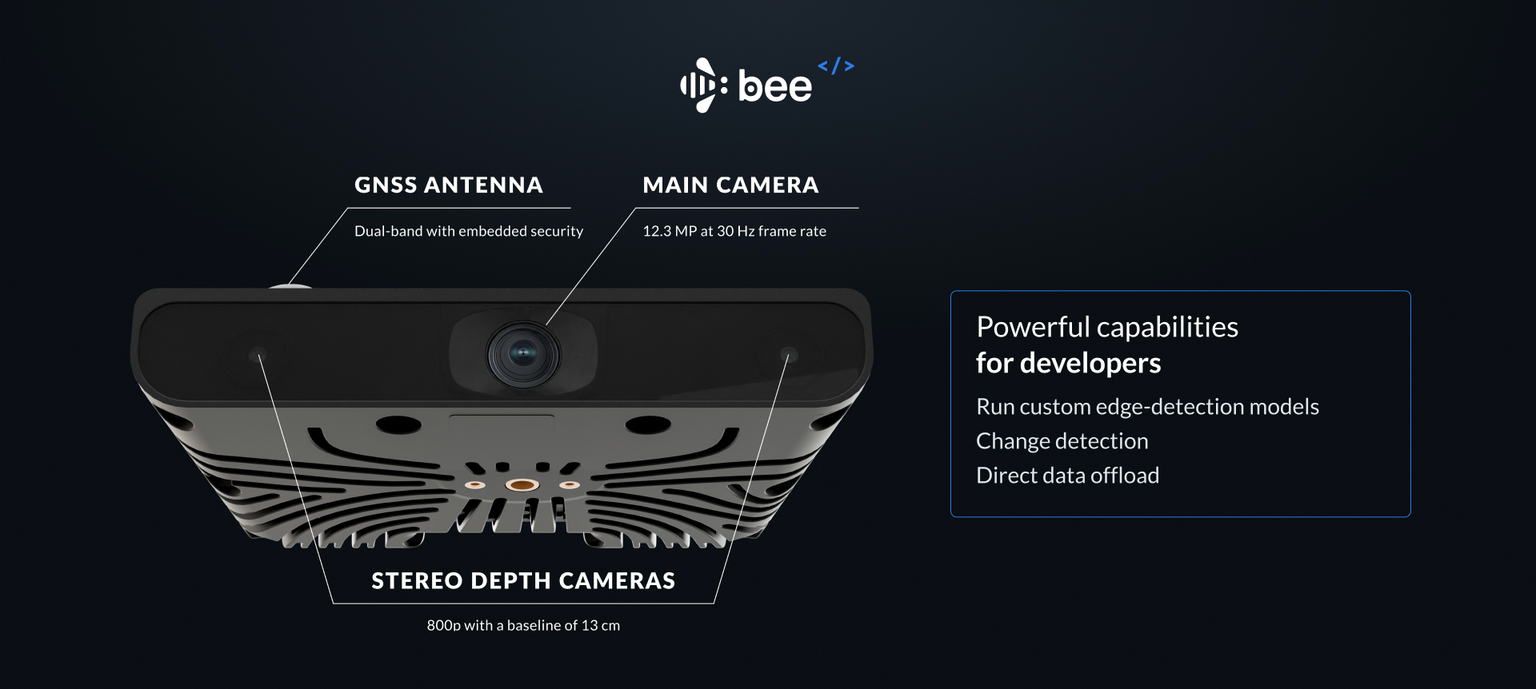
Edge Modules are Python programs that run on the Bee camera to collect the data you need from the physical world. They have access to all onboard sensors and can run custom ML models alongside the native Map AI stack.
Capabilities
| Feature | Details |
|---|---|
| Sensors | 12.3MP camera, stereo depth imagery, GPS, IMU, accelerometer |
| Compute | 5.1 TOPS NPU, runs inference offline on-device |
| Deployment | OTA via Bee Maps infrastructure |
| Targeting | Country, state, metro, city |
| Output | Structured JSON, Imagery, Imagery + Depth, Video, Telemetry |
Sensor Access
Edge Modules can access all onboard sensors:
| Sensor | Data |
|---|---|
| Camera | 12.3MP RGB frames at 30 FPS |
| Depth | Stereo depth imagery with distance estimation |
| GPS | Latitude, longitude, altitude, speed, heading |
| IMU | Accelerometer and gyroscope (6-axis) |
| Calibration | Device-specific calibration data for accurate object positioning |
Running Custom Models
Run object detection and classification directly on the edge. The 5.1 TOPS NPU handles inference offline -- no cloud dependency.
| Model Type | Description |
|---|---|
| Detection Models | Detect and position objects in a scene: "speed limit sign at coordinates X,Y" |
| Classification Models | Binary or multi-class classification: "is there a baby stroller in frame?" |
Geographic Targeting
Deploy modules to specific regions. Devices receive your module only when operating within targeted areas.
| Level | Description |
|---|---|
| Country | All devices in a country |
| State/Province | All devices in a state or province |
| Metro | All devices in a metropolitan area |
| City | All devices in a given city (e.g., Santa Monica, CA) |
Data Offload
Edge Module output streams to your cloud via Bee Connectivity Services, or upload to Bee Maps and consume via API.
Connectivity Channels
| Channel | Use Case | Behavior |
|---|---|---|
| LTE | Real-time critical data, small payloads | Always on, immediate delivery |
| WiFi | Bulk imagery, large payloads | Batched delivery when connected |
Output Configuration
| Data Type | Typical Size | Default Delivery |
|---|---|---|
| Detections (JSON) | ~1 KB per event | Real-time via LTE |
| Frame crop | ~50 KB | Real-time via LTE |
| Full frame (12.3MP) | ~2 MB | Batched via WiFi |
| Depth crop | Variable | Batched via WiFi |
| Video clip | Variable | Batched via WiFi |
Deployment Workflow
- Create Module -- Define configuration and upload your model via Bee Maps console
- Configure Output -- Set your endpoint and select data types
- Set Targeting -- Define geographic regions
- Staging Deploy -- Push to a small device subset to validate accuracy
- Production Deploy -- Roll out to full target region via OTA
Example Use Cases
Retail & Places Churn
Monitor storefronts to detect business changes -- new openings, closures, rebrands.
What you detect: "For lease" signs, changed storefront signage, boarded windows, new business openings
Output: Structured change events with imagery, fed into places databases to keep POI data fresh without manual surveys.
Complex Intersection Video
Capture video clips at specific intersections for traffic analysis, urban planning, or safety studies.
How it works: Define target intersections via GeoJSON or auto-detect based on traffic light count. Trigger recording when devices enter the zone. Collect multi-angle footage as different vehicles traverse the same intersection over time.
Output: Geotagged video clips from multiple perspectives, timestamped for temporal analysis.
Long-Tail Event Capture
Detect rare but critical events for autonomous vehicle training and safety validation.
Example events: Pedestrians with strollers, wheelchair users crossing, animals in road, unusual vehicle types, construction zone edge cases, adverse weather conditions
How it works: Run lightweight classifiers on-device. Upload only when target events are detected. Build datasets of real-world edge cases at global scale.
Output: Annotated imagery and video of rare events, with full sensor context.
World Model Training Data
Collect synchronized video + depth + IMU data for training world models and vision foundation models.
Data captured: High-resolution video (12.3MP @ 30fps), stereo depth imagery, full IMU telemetry, precise GPS positioning
Targeting options: Road types (highway, urban, rural), weather conditions, geographic regions, time of day
Output: Synchronized multimodal sensor data at scale -- the raw ingredients for physical world simulations.
Developer SDK
Build and test Edge Modules locally before deployment.
Repository: github.com/Hivemapper/bee-plugins
Quick Start
# Install dependencies
python3 -m pip install -r requirements.txt

# Build your plugin
bash build.sh [output_name] [entrypoint]
Local Development
Connect to the Bee over WiFi (password: hivemapper) and iterate locally with hot-reload.
| Command | Description |
|---|---|
python3 devtools.py -dI | Enable dev mode (prevents OTA overwrites) |
python3 devtools.py -i myplugin.py | Upload plugin (auto-restarts service) |
python3 devtools.py -R | Restart plugin service |
python3 devtools.py -dO | Disable dev mode |
Fixture Data
Test with pre-built datasets before deploying to real devices:
| Command | Description |
|---|---|
python3 devtools.py -f sf | Load San Francisco fixture |
python3 devtools.py -f tokyo | Load Tokyo fixture |
python3 devtools.py -d | Dump cache to local machine |
Device Utilities
# Get calibration data for accurate positioning
python3 device.py -C > calibration.json

# Network management
python3 device.py -Wi <ssid> -P <password>  # Switch to WiFi
python3 device.py -L                         # Switch to LTE
python3 device.py -Ws                        # Scan WiFi networks
Getting Started
- Clone the SDK: github.com/Hivemapper/bee-plugins
- Build and test locally with fixture data
- Email us to get API credentials and deploy