When using the Bee device with LTE connectivity for data upload, you may need to configure the correct Access Point Name (APN) settings for your mobile carrier. This page provides APN configuration details for major carriers across multiple countries.
#What is an APN?
An Access Point Name (APN) is a gateway between a mobile network and the internet. It tells your device how to connect to your carrier's network for data transmission. Using the correct APN settings ensures reliable data upload from your Bee device.
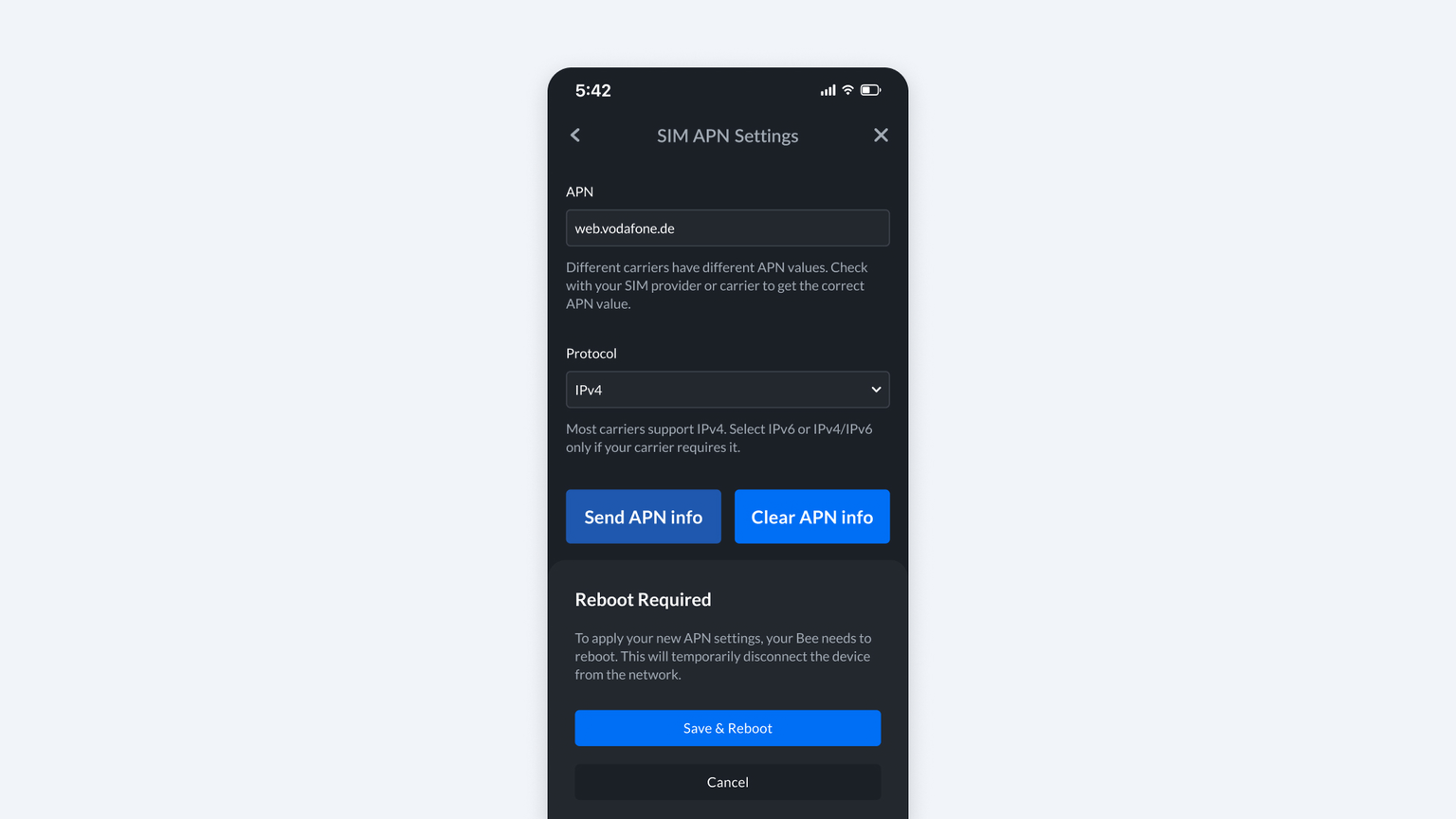
#How to Set Your APN Setting via the Bee App
- Go to Settings -> Bee -> Upload Mode -> Bee LTE -> SIM APN Settings.
- Enter the APN details provided by your mobile carrier and hit 'Send APN info'.
- Select 'Save and Reboot'.
#United States
| Carrier | APN | Protocol |
|---|
| AT&T | broadband | IPv4/IPv6 |
| Verizon | vzwinternet | IPv4/IPv6 |
| T-Mobile | fast.t-mobile.com | IPv4/IPv6 |
| US Cellular | usccinternet | IPv4 |
#Canada
| Carrier | APN | Protocol |
|---|
| Rogers | ltemobile.apn | IPv4/IPv6 |
| Bell | pda.bell.ca | IPv4/IPv6 |
| Telus | sp.telus.com | IPv4/IPv6 |
| Freedom | internet.freedommobile.ca | IPv4 |
#Mexico
| Carrier | APN | Protocol |
|---|
| Telcel | internet.itelcel.com | IPv4/IPv6 |
| Movistar | internet.movistar.mx | IPv4 |
| AT&T Mexico | web.attmex.mx | IPv4/IPv6 |
#Europe (EU + UK)
#Germany
| Carrier | APN | Protocol |
|---|
| Deutsche Telekom | internet.telekom | IPv4/IPv6 |
| Vodafone | web.vodafone.de | IPv4/IPv6 |
#France
| Carrier | APN | Protocol |
|---|
| Orange | orange.fr | IPv4/IPv6 |
#Spain
| Carrier | APN | Protocol |
|---|
| Movistar | telefonica.es | IPv4/IPv6 |
#Italy
| Carrier | APN | Protocol |
|---|
| TIM | ibox.tim.it | IPv4/IPv6 |
| Vodafone | web.omnitel.it | IPv4/IPv6 |
| WindTre | internet.wind | IPv4 |
| Iliad | iliad | IPv4 |
#United Kingdom
| Carrier | APN | Protocol |
|---|
| EE | everywhere | IPv4/IPv6 |
| Vodafone | wap.vodafone.co.uk | IPv4/IPv6 |
| O2 | payandgo.o2.co.uk | IPv4/IPv6 |
| Three | three.co.uk | IPv4/IPv6 |
#United Arab Emirates
| Carrier | APN | Protocol |
|---|
| Etisalat | mnet | IPv4/IPv6 |
| Du | du | IPv4/IPv6 |
#Troubleshooting
#My carrier is not listed
If your carrier is not listed, contact your carrier's support to get the correct APN settings. Enter them manually via the Bee App.
#LTE still not connecting after setting APN
- Double-check the APN name is entered exactly as shown (case-sensitive).
- Confirm your SIM card has an active data plan.
- Restart your Bee device after saving the APN settings.
- Ensure you are in an area with LTE coverage for your carrier.
#Carrier-specific notes
Some carriers issue enterprise or IoT SIM cards with different APN settings than consumer plans. If you are using a business or IoT SIM, contact your carrier for the correct APN.
