
There is a pattern I find interesting in how most driving data APIs work today. You get a video clip and a GPS coordinate. Maybe a timestamp and an event label. And that is genuinely useful — you can see what happened and where it happened. But the representation compresses away almost everything about the physics of the moment. The forces that acted on the vehicle, the exact millisecond the driver's foot hit the brake, whether the car tracked straight or yawed sideways — all of that is lost.
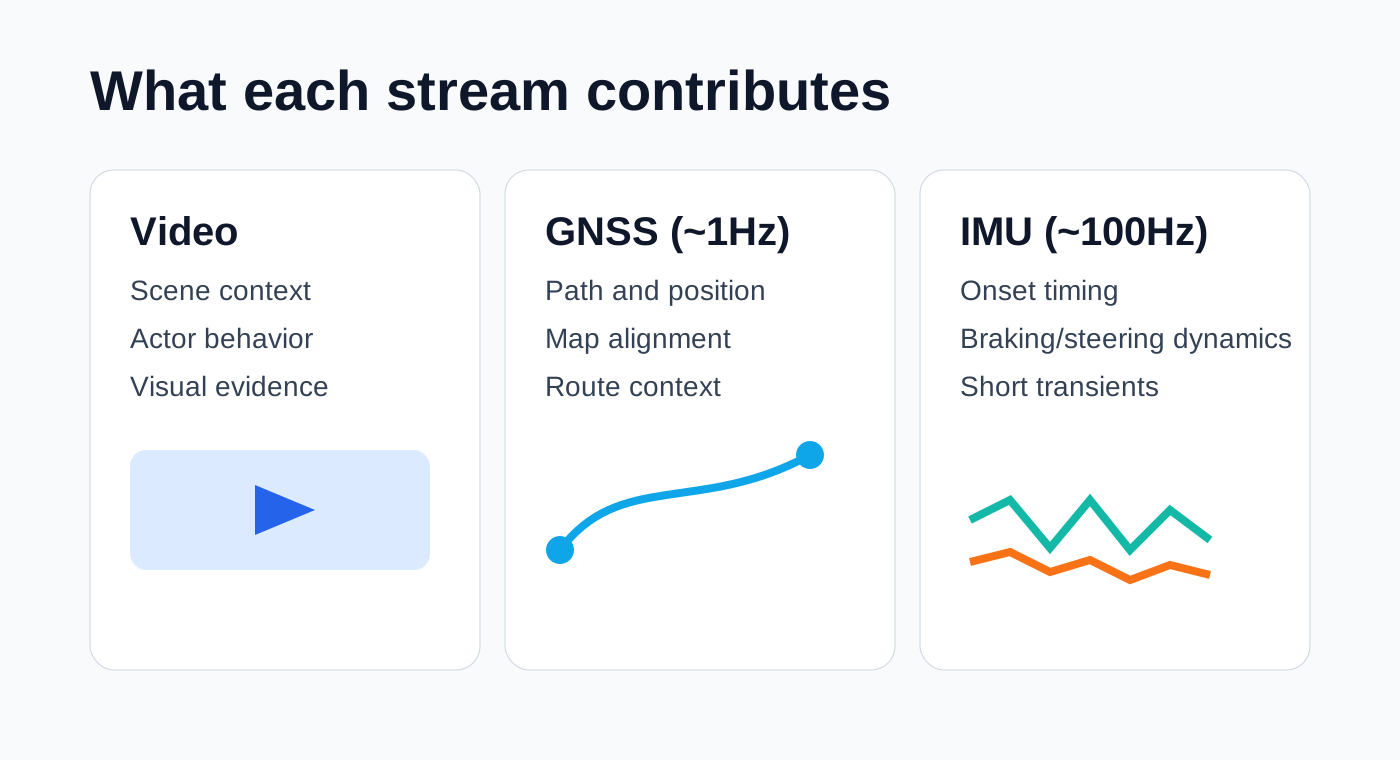
We have been working on something different with the Bee Maps AI Events API. When you expand an event, the payload can include three synchronized streams: dashcam video, GNSS positioning at ~1Hz, and 6-axis inertial measurement unit (IMU) data at approximately 100Hz. This post walks through what that actually looks like in practice — the data structures, the access patterns, and what you can do with it that you cannot do with video and GPS alone.
The three streams
Each expanded event can include:
- Video — what happened on the road, from a windshield-mounted dashcam
- GNSS (~1Hz) — where the vehicle was, traced as a sequence of lat/lon/altitude points
- IMU (~100Hz) — how the vehicle moved, measured as acceleration and rotation on three axes
The IMU is the part I want to spend the most time on, because it is probably the least familiar and arguably the most information-dense. A 6-axis IMU measures three channels of linear acceleration and three channels of angular velocity:
| Signal | What it captures |
|---|---|
acc_x | Longitudinal acceleration and deceleration — the force you feel pushing you into or pulling you out of your seatbelt |
acc_y | Lateral acceleration — the sideways force in turns, lane changes, and swerves |
acc_z | Vertical acceleration, which includes gravity projection — this one is tricky because it depends heavily on mount angle |
gyro_x | Roll rate — how fast the vehicle is tilting side to side |
gyro_y | Pitch rate — the nose-up/nose-down rotation you feel during hard braking or acceleration |
gyro_z | Yaw rate — how fast the vehicle is rotating left or right, like a compass needle |
One important caveat that is easy to overlook: these axis labels assume a specific mounting orientation. In practice, a dashcam mounted at a slight angle will project gravity differently across the accelerometer channels. Do not hardcode assumptions like "z is always straight down" across all devices. Treat mount orientation as a variable unless you have explicit calibration data.
You may also encounter two derived speed fields in the metadata:
SPEED_ARRAY: computed from frame-level GPS positions roughly every 8–12 metersSPEED_HISTORY: computed from IMU-based speed estimates at ~0.125s resolution
How to fetch the data
The access pattern is intentionally two-step: search first with lightweight filters, then expand the specific events you care about with the full sensor payload. This keeps the search response small and fast.
Step 1: Search events
curl -X POST https://beemaps.com/api/developer/aievents/search \
  -H "Authorization: Basic <your-api-key>" \
  -H "Content-Type: application/json" \
  -d '{
    "startDate": "2026-02-01T00:00:00.000Z",
    "endDate": "2026-02-25T00:00:00.000Z",
    "types": ["HARSH_BRAKING", "HIGH_G_FORCE", "SWERVING"],
    "limit": 50,
    "offset": 0
  }'
The constraints here are straightforward: date ranges max out at 31 days, you can filter by event type, and results are paginated.
Step 2: Expand a specific event with sensor streams
curl "https://beemaps.com/api/developer/aievents/69581dad62cb7e369e720878?includeGnssData=true&includeImuData=true" \
  -H "Authorization: Basic <your-api-key>"
Here is what the response looks like (trimmed for clarity):
{
  "id": "69581dad62cb7e369e720878",
  "type": "HARSH_BRAKING",
  "timestamp": "2026-01-02T19:33:00.000Z",
  "lat": 34.216829,
  "lng": -119.034344,
  "videoUrl": "https://...",
  "metadata": {
    "SPEED_MS": 31.6,
    "ACCELERATION_MS2": -8.5
  },
  "gnssData": [
    { "timestamp": 1735845180000, "lat": 34.216802, "lon": -119.034512, "alt": 52.3 }
  ],
  "imuData": [
    { "timestamp": 1735845180010, "acc_x": -2.34, "acc_y": 0.28, "acc_z": -10.12, "gyro_x": 0.015, "gyro_y": 0.042, "gyro_z": -0.008 }
  ]
}
A small but worth-noting detail: field names can vary between API surfaces and versions. Some responses use acc_x/gyro_x, while some documentation shows shorter aliases like ax/gx. Always validate against your actual response shape rather than assuming consistency.
What this looks like on real events
I think the best way to understand what IMU data actually gives you is to look at two events of different types side by side and notice how the sensor signatures diverge.
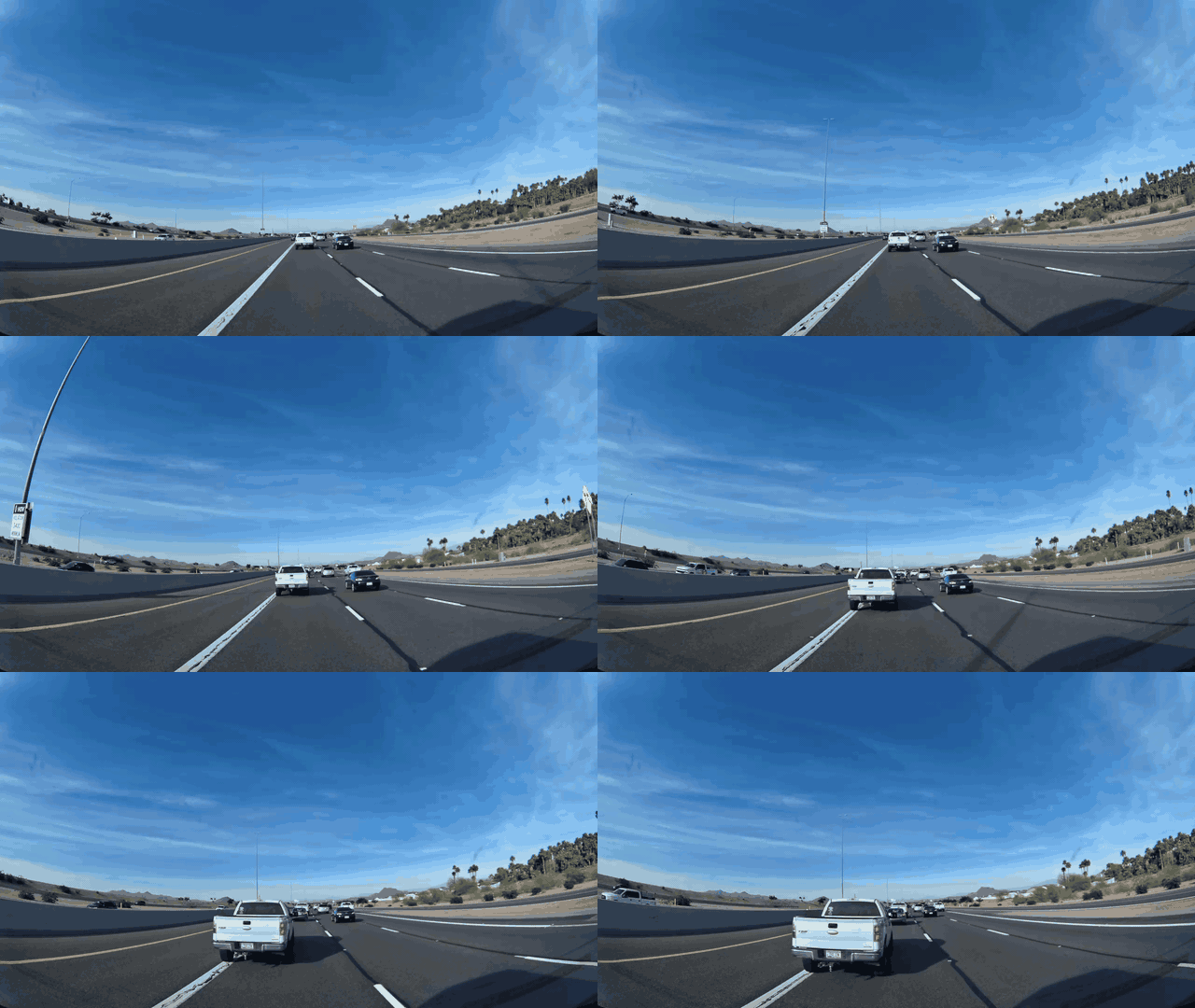
A harsh braking event near Scottsdale, Arizona
Here is a vehicle cruising at roughly 75 mph on a divided highway in the Scottsdale area. Something ahead caused a hard stop — the kind where you feel your seatbelt lock and everything on the passenger seat slides forward.
Metadata
| # | Latitude | Longitude | Altitude | Time |
|---|---|---|---|---|
| 1 | 33.468552 | -111.782604 | 348.7m | 11:22:11 PM |
| 2 | 33.469489 | -111.781966 | 351.8m | 11:22:14 PM |
| 3 | 33.470442 | -111.781350 | 354.4m | 11:22:18 PM |
| 4 | 33.471389 | -111.780736 | 356.6m | 11:22:22 PM |
| 5 | 33.472073 | -111.780288 | 357.3m | 11:22:25 PM |
| 6 | 33.472297 | -111.780139 | 357.6m | 11:22:29 PM |
| 7 | 33.472346 | -111.780107 | 357.7m | 11:22:32 PM |
| 8 | 33.472485 | -111.780015 | 357.7m | 11:22:36 PM |
Try this API query
curl https://beemaps.com/api/developer/aievents/699e32dbd822b2a48bce712b\
?includeGnssData=true\&includeImuData=true \
  -H "Authorization: Basic <your-api-key>"
The video and GNSS trace tell you where the vehicle was and what the scene looked like. But now look at the IMU data for this event:
You can toggle individual channels on and off in the legend. Try isolating acc_x — the braking onset becomes very sharp and legible.
What strikes me about the IMU trace is how much information it carries that is invisible in the video:
- The
acc_xchannel shows the precise moment braking begins — not "somewhere in this one-second window" but the actual onset, resolved to roughly 10 milliseconds. For anyone building driver scoring models or near-miss detection, that timing precision is the difference between useful data and noise. gyro_y(pitch rate) reveals the nose-dive dynamics as weight transfers to the front axle. This is a real physical signal — the vehicle is literally rotating forward — and it correlates with braking intensity in a way that is hard to fake or misinterpret.gyro_z(yaw rate) staying near zero tells you the vehicle braked in a straight line. This is important because it distinguishes a controlled emergency stop from a panic swerve, and the distinction matters for classifying the event correctly.
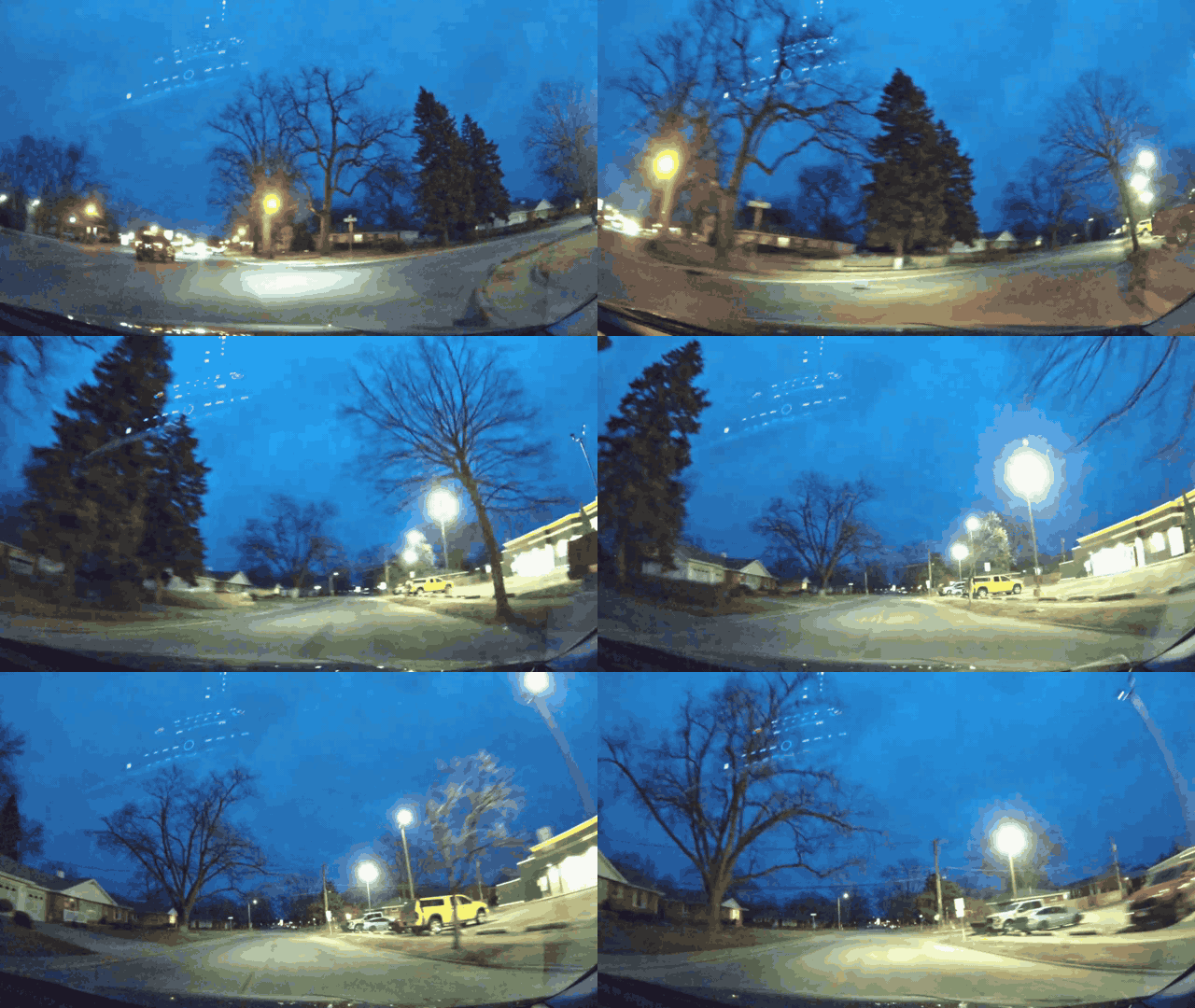
A swerving event in Kankakee County, Illinois
Now compare that with a completely different kind of event. This is a swerving detection at night on a residential road at about 38 mph — a sharp lateral maneuver where the dominant forces act sideways rather than forward.
Metadata
| # | Latitude | Longitude | Altitude | Time |
|---|---|---|---|---|
| 1 | 41.147759 | -87.875400 | 176.1m | 11:56:41 PM |
| 2 | 41.148223 | -87.875361 | 176.0m | 11:56:45 PM |
| 3 | 41.148802 | -87.875391 | 175.5m | 11:56:49 PM |
| 4 | 41.149260 | -87.875434 | 174.9m | 11:56:53 PM |
| 5 | 41.149368 | -87.875116 | 175.2m | 11:56:57 PM |
| 6 | 41.149365 | -87.874487 | 174.6m | 11:57:01 PM |
| 7 | 41.149365 | -87.873815 | 174.4m | 11:57:05 PM |
| 8 | 41.149366 | -87.873183 | 174.2m | 11:57:09 PM |
Try this API query
curl https://beemaps.com/api/developer/aievents/699e3af38bb3d72bbc00b0a7\
?includeGnssData=true\&includeImuData=true \
  -H "Authorization: Basic <your-api-key>"
The IMU signature here is essentially the inverse of the braking event. acc_y (lateral acceleration) dominates instead of acc_x. The gyroscope's gyro_z (yaw rate) spikes as the vehicle rotates through the maneuver, while gyro_y (pitch) stays comparatively flat. It is a fundamentally different fingerprint of a fundamentally different physical event, and the IMU makes the distinction unambiguous in a way that video classification alone sometimes struggles with — especially at night, or in rain, or from unusual camera angles.
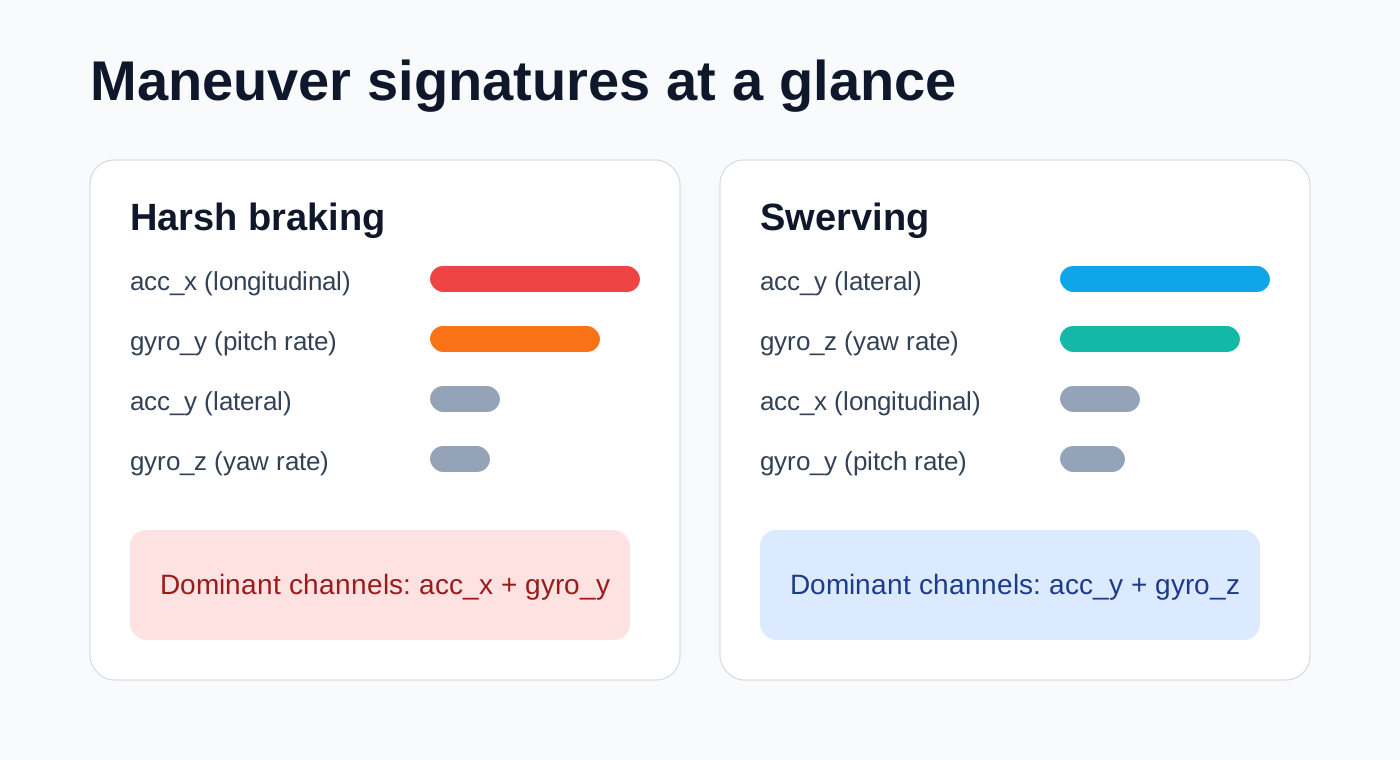
This is the thing I think is genuinely underappreciated about having IMU alongside video: the sensor data does not replace visual understanding, but it provides an independent physical signal that either corroborates or contradicts what the video seems to show. For anyone building classifiers or scoring algorithms, that kind of multi-modal cross-validation is quite valuable.
Why the sampling rate matters
There is a real question about whether 100Hz is necessary, or whether lower-rate telemetry would suffice. The honest answer is that it depends on what you are trying to detect.
At 1Hz — which is roughly what you get from GPS-derived speed — you can tell that a vehicle braked hard during some one-second window. At 10Hz, you can see the general shape of the deceleration curve. But at ~100Hz, you can resolve individual transients: the exact frame where braking onset occurs, brief corrective swerves that last 200 milliseconds, oscillations in the suspension during rough braking. These are the signals that distinguish a controlled stop from a skid, or a deliberate lane change from an instinctive avoidance maneuver.
For many fleet management use cases, 1Hz is perfectly adequate. But for training computer vision models, building driver coaching systems, or doing any kind of serious incident reconstruction, the high-rate IMU data is carrying information that simply does not exist at lower sampling rates.
Building with this data
I want to be concrete about what you can actually build with synchronized video + GNSS + high-rate IMU. Some things I think are particularly interesting:
Near-miss severity scoring. Video tells you that two vehicles got close. IMU tells you how close to losing control the driver actually was — the peak lateral G-force, the yaw rate, the braking onset timing relative to the visual trigger. These are quantitative inputs to a severity model that would be impossible to derive from video alone.
Driver coaching with physical evidence. Instead of telling a driver "you had a harsh braking event," you can show them the exact moment their reaction started, how the deceleration profile compared to an optimal controlled stop, and whether they maintained lane discipline throughout. The IMU data turns a binary alert into a detailed performance review.
Training data for physical AI. If you are building models that need to understand vehicle dynamics — autonomous driving planners, simulation engines, predictive safety systems — you need paired observations of what happened visually and what happened physically. That is exactly what this payload provides: synchronized video frames and high-rate inertial measurements from the same event.
Video shows you what happened. Position shows you where. Force shows you how it felt. Most driving APIs stop at the first layer. We think the interesting work starts when you have all three — and the tools in this post are how you get there.
Follow us on X or Try Bee Maps for Free.
AI agent data pack
This section is structured for programmatic consumption by agents and automated pipelines. If you are building an integration that needs to discover and process these events autonomously, this is your reference.
Endpoint spec
{
  "search": {
    "method": "POST",
    "path": "/aievents/search",
    "required": ["startDate", "endDate"],
    "optional": ["types", "limit", "offset"],
    "constraints": {
      "max_date_range_days": 31,
      "max_limit": 500
    }
  },
  "detail": {
    "method": "GET",
    "path": "/aievents/{id}",
    "query": ["includeGnssData", "includeImuData"]
  }
}
Available event types
HARSH_BRAKING, AGGRESSIVE_ACCELERATION, SWERVING, HIGH_SPEED, HIGH_G_FORCE, STOP_SIGN_VIOLATION
Additional types may become available depending on detection rollout and account tier.
Field normalization map
Field names are not always consistent across API surfaces. This map covers the aliases we have observed:
{
  "location": ["lat,lng", "location.lat,location.lon"],
  "imu": {
    "acc_x": ["acc_x", "ax"],
    "acc_y": ["acc_y", "ay"],
    "acc_z": ["acc_z", "az"],
    "gyro_x": ["gyro_x", "gx"],
    "gyro_y": ["gyro_y", "gy"],
    "gyro_z": ["gyro_z", "gz"],
    "timestamp": ["timestamp", "unix_milliseconds"]
  }
}
Normalized event schema
{
  "event_id": "string",
  "event_type": "string",
  "event_timestamp_iso": "string",
  "position": { "lat": "number", "lon": "number" },
  "video_url": "string|null",
  "gnss": [
    { "t_ms": "number", "lat": "number", "lon": "number", "alt_m": "number|null" }
  ],
  "imu": [
    {
      "t_ms": "number",
      "acc_x": "number",
      "acc_y": "number",
      "acc_z": "number",
      "gyro_x": "number",
      "gyro_y": "number",
      "gyro_z": "number"
    }
  ],
  "metadata": {
    "speed_ms": "number|null",
    "acceleration_ms2": "number|null",
    "speed_array": "array|null",
    "speed_history": "array|null"
  }
}
Extraction recipe
{
  "step_1": "search events by date/type with lightweight payload",
  "step_2": "select candidate IDs by metadata and event type",
  "step_3": "fetch details with includeGnssData=true&includeImuData=true",
  "step_4": "normalize field names using alias map",
  "step_5": "compute features: peak_decel, decel_onset_ms, yaw_peak, lateral_peak, event_duration_s",
  "step_6": "store compact feature row + raw payload reference"
}
Cautions for autonomous interpretation
- Mount orientation is variable unless calibrated per device. A 15-degree tilt will mix gravity into your lateral acceleration channel in ways that look like real lateral forces.
- Use synchronized video when inferring intent or causality. IMU data tells you what the vehicle did, not why. The video provides context that turns kinematic data into a narrative.
- Avoid forensic or legal certainty language derived from IMU alone. These are consumer-grade MEMS sensors, not laboratory instruments.
- Validate threshold heuristics across geography, vehicle class, and firmware cohort. What counts as "harsh" braking in a loaded semi-truck is very different from a sedan on dry pavement.